Mixcloud Download MP3 – Free Online Converter | BraveDown
Save any Mixcloud mix as MP3 — fast, free, no account
Turn any Mixcloud link into an offline MP3 file
Mixcloud is home to thousands of DJ sets, radio shows, and long-form podcasts. When you want to take those mixes offline — for commutes, travel, or uninterrupted focus sessions — Mixcloud download MP3 with BraveDown is the cleanest, browser-based way to do it: no app installs, no account walls.
Quick tips
- Paste a direct mix/podcast URL — not a search or profile page.
- If it fails, refresh the page and re-paste the link.
- Audio quality reflects the original upload — not the tool.
- Keep downloads personal and respect creator rights.
What this tool does
A reliable Mixcloud downloader should do exactly one job well: accept a valid Mixcloud URL and convert it into a playable audio file you can keep. This page is built for people searching mixcloud download mp3, mixcloud to mp3, or mixcloud downloader free — and who simply want clear, honest steps rather than a maze of redirects.
BraveDown handles the entire process in your browser. Paste your link, let the tool process it, and save the file — whether you're on a laptop or scrolling on your phone. No software to install, no registration required.
Why save Mixcloud audio offline
Mixcloud specializes in long-form content — hour-long DJ sets, archived radio broadcasts, deep-dive talk shows. Streaming them every time is inconvenient on mobile data, or simply impractical when you're offline. A Mixcloud to MP3 file you own locally is always ready to play.
Reliable offline playback
Keep your favorite mixes ready for flights, commutes, or any low-signal area.
Easy personal organization
Rename files by artist or genre and build offline playlists your way.
What users typically look for
- A fast mixcloud to mp3 converter workflow with as few steps as possible
- A mixcloud downloader that works smoothly on Android and iOS
- No signup, no tracking — just a clean download from mixcloud experience
- Standard MP3 output that plays on any device or media player
Key features of BraveDown
Whether your search was mixcloud downloader mp3, mixcloud mp3, or just mixcloud downloader free, the intent is the same: get your audio file without friction. Here's what BraveDown focuses on delivering:
Beginner-friendly speed
Paste → process → download. No confusing settings, no multi-step forms.
Cross-device compatibility
Runs in modern browsers on desktop, tablet, and mobile — no app install needed.
Optimized for offline replay
Output quality mirrors the original source — ideal for long mixes and archived shows.
No account required
Jump straight into a mixcloud download — no registration, no email, no barriers.
The phrases "mixcloud downloader mp3" and "mixcloud to mp3" describe the same workflow: converting a Mixcloud page URL into a local MP3 file. BraveDown covers both.
How to download Mixcloud to MP3 (step-by-step)
Open the correct Mixcloud page
Navigate to the specific mix, DJ set, or podcast you want. This must be a direct content page — not a profile or search results page — for an accurate mixcloud download.
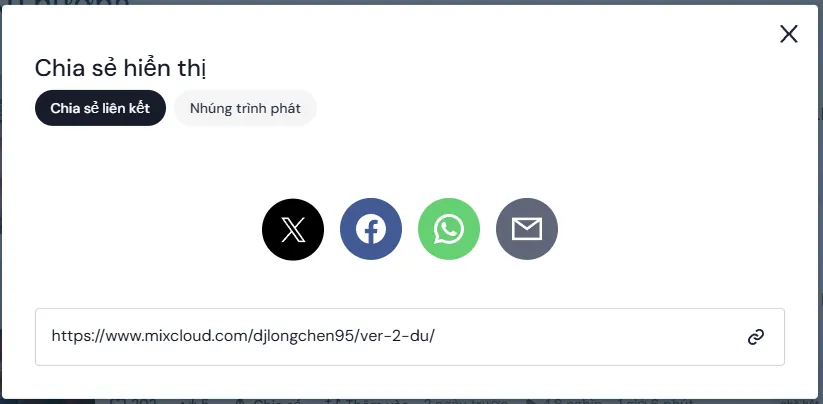
Copy the URL
Copy the full address from your browser bar — or use Mixcloud's Share button → "Copy link." Either method works.
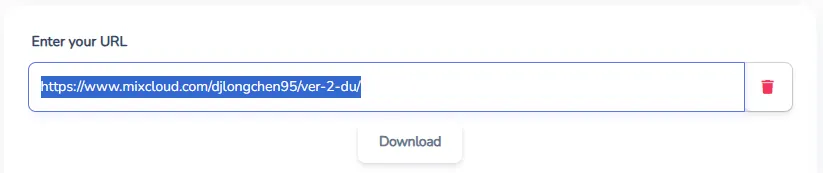
Paste into BraveDown and process
Paste the URL into the input field and start processing. The tool handles the mixcloud to mp3 converter step automatically — nothing to configure.
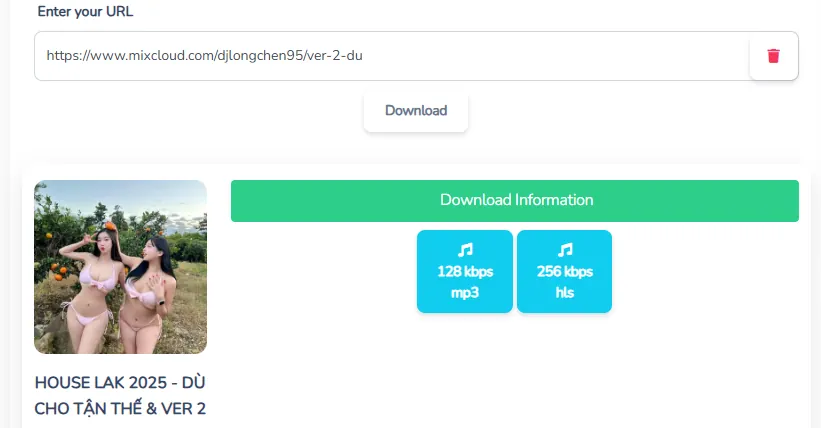
Download and organize your file
Save the Mixcloud download MP3 file to your device. Rename it by artist, show title, or date for easy offline organization later.
Tip for higher success rates
Most "download from mixcloud" failures come from pasting a profile or playlist URL instead of a direct mix page. Double-check the URL, refresh, and try again — that fixes the majority of errors.
Troubleshooting common issues
If your Mixcloud Downloader attempt doesn't return a file, it's almost always one of the issues below. Try these quick fixes first before anything else:
Invalid or incomplete URL
Ensure the link points to a specific mix page. Re-copy from the address bar to avoid truncated characters.
Slow network or long content
DJ sets over 60 minutes need more processing time. Switch to stable Wi-Fi and retry after a brief pause.
Mobile download not starting
Switch to Chrome or Safari, check available storage, and confirm your browser allows file downloads.
Quality lower than expected
Output quality can't exceed the original source. If the upload was compressed, the downloaded mixcloud mp3 will reflect that.
Safety & copyright responsibility
Downloaded audio should be used for personal offline listening — archiving your favorites, studying mixes, or replaying shows you've already streamed. Please respect the artists and creators behind every upload.
- Avoid re-uploading or redistributing content you don't own the rights to.
- Only paste links to content you've chosen yourself and trust the source of.
- Love a show? Follow it on Mixcloud too — creators benefit most from active, engaged listeners.
Ready to save your next mix?
If you're looking for a clean, no-fuss Mixcloud downloader experience, BraveDown keeps things simple. Paste your link, process it in seconds, and walk away with an MP3 ready for offline listening — no account, no clutter.
Frequently Asked Questions
A Mixcloud downloader is an online tool that converts a Mixcloud mix or podcast URL into a downloadable audio file — typically MP3 — for offline listening. You paste the link, the tool processes it, and you save the file. Output quality depends on the original upload.
Open the specific Mixcloud mix or podcast page, copy its full URL, paste it into BraveDown's Mixcloud downloader field, and start processing. Once complete, save the MP3 to your device and rename it for easy offline organization by artist, date, or genre.
Yes. BraveDown works entirely in your browser — no app or extension to install. Paste the Mixcloud link and download directly online, which makes it convenient for quick workflows on both desktop and mobile devices.
Yes. A web-based Mixcloud downloader works on Android and iOS through modern browsers like Chrome or Safari. If a download doesn't start, check your browser's download permissions, confirm you have storage space, or switch to a different browser.
The most common cause is an incorrect URL — make sure it's a direct mix or podcast page, not a profile or search result. Network issues or very long content can also cause timeouts. Refresh the page, re-copy the exact URL, and try again.
Not always. The quality of a Mixcloud download MP3 depends entirely on how the original audio was uploaded. A heavily compressed source upload will produce a lower-quality file — the downloader cannot improve on what the original creator provided.
Yes, but longer mixes take more time to process. Use a stable Wi-Fi connection and allow the tool to finish without closing the tab. After downloading, organize your files by show name or date to make offline listening easier.
It can be, if you use a reputable tool and only paste links you trust. Avoid clicking suspicious pop-ups or installing unknown browser extensions. A simple browser-based Mixcloud downloader MP3 workflow — like BraveDown's — is generally safer than installing third-party software.
Go to the specific mix or podcast page on Mixcloud and copy the URL from your browser's address bar. You can also click the Share button and choose 'Copy link.' Paste that exact URL into the Mixcloud Downloader for the best results.
Yes, free Mixcloud downloader tools are available online, including BraveDown. No payment or signup is required to use it. If a download fails — especially for long mixes — wait a moment and retry, as processing load can occasionally cause temporary delays.
Popular Tools


