TikTok Video Downloader Without Watermark for Phone and PC
Keep useful TikTok clips within reach: paste a public video link, review the available options, and save a copy for later
Unlock Pro Features & Unlimited Downloads
TikTok video downloader without watermark
Keep the clip. Come back to the useful part.
A recipe worth trying, a tutorial worth practicing, or an editing idea worth studying should be easy to revisit. SnapTik gives you a browser-based way to save public TikTok videos for later viewing.
Start with the video link, paste it into the downloader, and review the available results. Choose a watermark-free download option when offered, then save the file to your phone, tablet, or computer. Available quality and download options depend on the clip.
Start with the right link
Copy the link for an individual public video you have permission to save. A profile address or a link to unavailable content may not produce a downloadable result.
Your download guide
Follow the full walkthrough or jump to the detail you need.
A practical way to save TikTok videos
A TikTok downloader online connects a copied video URL with the download options available for that post. Instead of searching through your feed again, you can keep a local copy of a useful clip and return to it when you are ready to watch or practice.
With SnapTik, the workflow takes place in your browser, without installing a separate downloader application or extension. The starting point is the same across devices: open the original post, copy its link, and paste that address into the tool. Your browser handles the final file download.
What “without watermark” means
A watermark-free option is intended to provide a copy without TikTok’s added watermark. It does not establish ownership of the video or promise to remove captions, logos, or text embedded in the original footage. Preview the saved file to check the actual result before keeping it.
Make saved clips easier to use
Downloading is most useful when you know why you want the video. Give each saved clip a clear purpose and a recognizable filename so your collection remains easy to browse.
Practice at your own pace
Revisit a cooking technique, a craft demonstration, or a short lesson. A saved file lets you pause and replay the relevant moment without finding the post again.
Prepare for offline viewing
Save the clips you need before a journey or a period with limited connectivity. Open each completed download once to check that it plays before you go offline.
Build a reference collection you can navigate
Group useful clips by topic, such as recipes, tutorials, or visual inspiration. Keep the original post link and creator name alongside your notes so you can return to the source and check its context.
- Use filenames that describe the subject of the clip.
- Keep only the versions you need to avoid duplicates.
- Record permission details when a creator has authorized reuse.
How to download TikTok videos with SnapTik
Have the video open before you begin. These three steps take you from the original post to a file you can locate and play later.
- 01
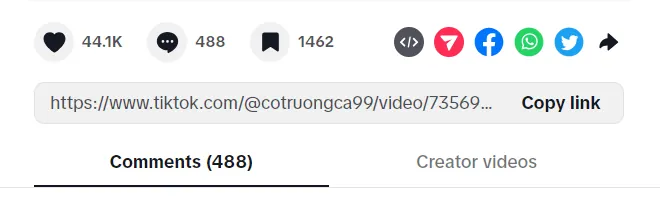
Copy the video’s TikTok link
Open the public video you want to save. Use its Share menu and select Copy link. Make sure you are sharing the individual post, rather than the creator’s profile. If you are unsure, open the copied address in your browser and check the video.
- 02
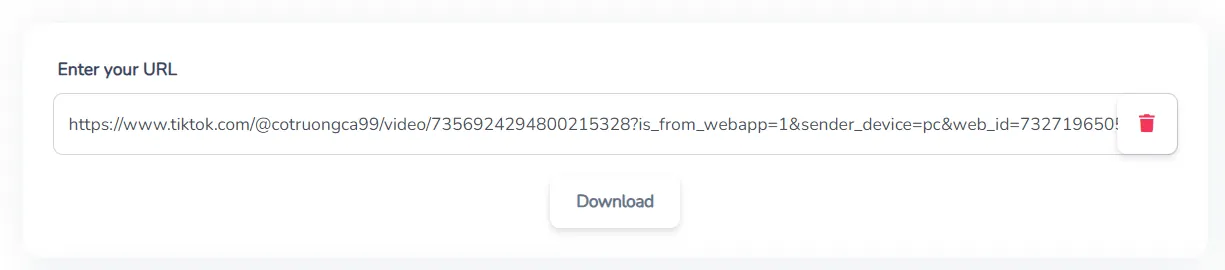
Paste the link into SnapTik
Open SnapTik in your browser and paste the copied URL into the downloader field. Remove any surrounding message text that was copied with it, then start processing the link. Review the result to confirm that it matches the clip you intended to download.
- 03
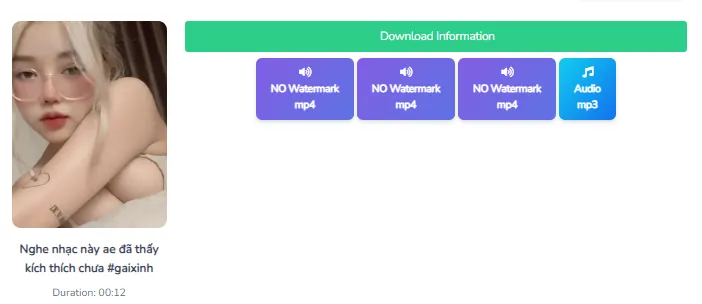
Select an available download and check the file
Choose the watermark-free option if it is available. If multiple quality choices appear, select the one that suits your viewing needs and storage space. Let the download finish, then open your browser’s downloads list to locate the file and check its picture and sound.
Get a usable file and resolve common problems
Choose quality based on the source
TikTok video quality depends on the original upload and the download options presented. A higher-quality option can be useful for reading on-screen text or studying small details, but it cannot guarantee detail missing from the source. If only one option appears, check that file before assuming another resolution is available.
If the link does not produce a download
First, check whether the original post still opens in TikTok. A removed, private, or otherwise unavailable video may prevent the downloader from finding a usable result.
- Copy a fresh link from the original video’s Share menu.
- Check that you pasted the full address without extra text.
- Confirm that your connection is stable and storage is available.
- Retry later if the public post opens but processing still fails.
Find the video on your device
Start with the browser’s download manager. On iPhone, also check the Files app and the download location configured for your browser. On Android, check your file manager’s Downloads folder. On a computer, use the browser’s option to show the downloaded file in its folder. Saving a file does not always add it directly to your photo gallery.
Have a useful TikTok clip in mind?
Copy its public link and open our TikTok downloader to review the available download options. Save the version that fits your needs, check that it plays, and keep the source link with your notes.
Need a reminder of the process? The walkthrough above covers copying the link, choosing a result, and finding the completed file on your device.
Follow the download stepsFrequently Asked Questions
Open the public TikTok video, select Share, and copy its link. Paste the URL into SnapTik and start processing it. Choose a watermark-free download option when available, select a quality if choices appear, and save the file. Open the completed download to check that it is the correct clip.
Copy the video link from TikTok and open SnapTik in your iPhone browser. Paste the link, process it, and select an available download. Check the browser’s downloads list or the Files app for the saved video. Its location depends on your browser settings, and it may not appear automatically in Photos.
Use TikTok’s Share menu to copy the public video link, then paste it into SnapTik in your browser. Select an available download and wait for it to finish. Look in your browser’s download manager or your file manager’s Downloads folder, then open the file to confirm that it plays.
The browser-based workflow described here does not require a separate downloader app or browser extension. Open SnapTik on your computer, paste a public TikTok video link, and select an available download. Your browser will save the file to its configured download location or ask you to choose a folder.
Quality depends on the original video and the options available when the link is processed. Choose a higher-quality version if one is offered and you need clearer visual details. An HD option is not guaranteed for every clip, and downloading cannot restore detail that is missing from the source.
The link may be incomplete, the post may no longer be public, or processing may have encountered a temporary problem. Check that the original video still opens, copy its link again, and paste the full address without extra text. Also check your connection and available storage before retrying.
The workflow described here is intended for public TikTok video links and does not provide a method for accessing private posts. If you need a copy of private content, ask the creator to share the original file directly. Do not use a downloader to bypass account privacy settings.
A watermark-free option refers to TikTok’s added watermark, not every visual element in the footage. Captions, creator logos, stickers, or other text embedded in the original video may remain. Preview the downloaded file to see the actual result rather than assuming that all overlays will be removed.
Audio availability depends on the source clip and the download option provided. After saving the video, play it with your device volume enabled to check the sound. If audio is missing, compare it with the original post and review any other available download options before trying again.
A watermark-free download does not include the creator’s permission to republish or adapt the content. Keep the original source link and ask the creator about your intended use before sharing their work elsewhere. For your own videos, keep an original copy when possible so you retain a reliable source file.
Popular Tools


