Douyin Video Downloader Without Watermark for HD MP4 Online
Download Douyin videos without watermark in crisp HD MP4 format instantly
Unlock Pro Features & Unlimited Downloads
A simpler way to save public short videos
Save Clean Douyin Clips in HD MP4
Douyin is home to short-form videos, creative edits, tutorials, and trends that may not appear on other social platforms. When you want to keep a public clip for offline viewing or an authorised editing project, a dependable download workflow can make the process much easier.
BraveDown is designed to help you submit a public Douyin share link and choose an available MP4 download option from a modern browser. When the source permits a clean stream, you can save the video without an obstructive watermark and keep the file ready for playback or personal organisation.
Use the original share link
A clean public URL gives the downloader the information it needs to locate the available video stream.
Works across devices
Follow the same browser-based process on a desktop, tablet, iPhone, or Android phone.
Use content responsibly: download public videos only when you have permission to store, edit, or repurpose them. Respect the creator’s copyright, privacy, and platform rules.
Quick navigation
Explore This Douyin Download Guide
Built for a focused workflow
Why Use an Online Douyin Downloader?
Screen recording is useful in some situations, but it can introduce extra steps and may affect the final viewing experience. A direct Douyin video download lets you work from the available source stream instead, making it easier to save, review, organise, or move a permitted clip into an editing workflow.
Clean output when the source allows it
The tool is designed to identify an available clean video stream rather than asking you to record your screen. If the public source provides a watermark-free option, the downloaded MP4 can be easier to reuse in a personal archive or an approved creative project.
HD MP4 options made easy to find
Once a link has been processed, review the available resolution options before saving. Choosing the highest option shown can help retain more detail, especially when the file will later be trimmed, captioned, or placed inside a larger video project.
A short browser-first process
You do not need to learn a complicated workflow. Copy the share link, paste it into the downloader, check the available result, and save the format that suits your device. This keeps the process practical for occasional downloads as well as organised personal collections.
Convenient on mobile and desktop
Because the process runs in a web browser, you can use it from Safari, Chrome, Edge, or another modern browser. A responsive layout also makes it suitable for saving a clip directly from your phone without installing an unverified downloader application.
Start with a public video
How to Download Douyin Videos Step by Step
The following timeline covers the complete Douyin to MP4 workflow. Before starting, make sure the video is publicly accessible and that you have permission to save or use it.
Copy the public share link
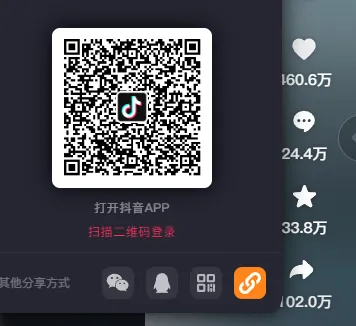
Open the official Douyin app and locate the video you want to save. Tap the Share arrow, then choose Copy Link. Copy only the link itself whenever possible, because extra captions or surrounding text may make the URL harder to process.
Paste the URL into the downloader
Open the BraveDown download page in your browser and paste the copied address into the input field. Check that the URL begins with the expected Douyin sharing format, remove any accidental spaces, and submit the link for processing.

Review the result and save the MP4
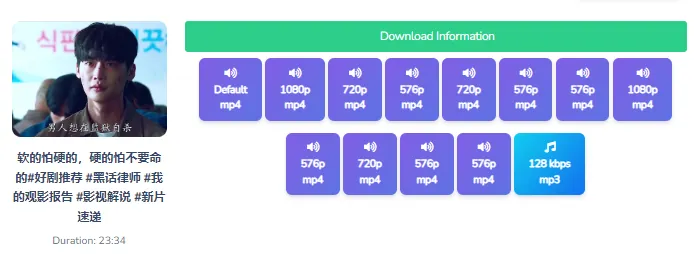
After the link is processed, review the available download choices. Select HD MP4 when that option is displayed, or choose the highest suitable resolution for your device and editing needs. The available quality depends on the source video and the formats returned for that link.
Make the most of each file
Improve Video Quality and Solve Common Issues
A capable Douyin video downloader HD workflow can help you start with the best available source, but no downloader can create detail that was not present in the original upload. For the clearest result, choose the highest resolution presented and keep the original file before making edits.
Practical tips for better downloads
Quick fixes
What to Check When a Link Fails
Private or restricted video
The downloader can generally work only with links that are publicly accessible. A private profile, follower-only post, removed video, or regional restriction may prevent the source from being retrieved.
Incomplete or altered URL
Copy the link again from the Share menu and paste it without additional Chinese captions, punctuation, or spaces. A clean short URL is easier for the Douyin video download process to parse.
Temporary processing timeout
Refresh the page and submit the public link again if the result does not appear. If the issue continues, try a different browser connection and confirm that the original video still plays publicly.
Ready to Save Your Next Douyin Clip?
Start with a public share link, select the best available format, and keep your workflow simple from any modern browser. For the fastest start, open the downloader and follow the three steps above.
Frequently Asked Questions
Copy the public share link from the Douyin app, paste it into the downloader input box, and submit it. Review the available formats, then select the highest-quality HD MP4 option shown. A watermark-free result depends on the source stream and what the public link makes available.
An online downloader is usually the simplest option because it keeps the workflow inside your browser. Copy a public Douyin link, paste it into the tool, and choose an available MP4 result. No separate desktop program or mobile application is required for the basic process.
You do not generally need an account to process a publicly accessible share link. However, private, follower-only, deleted, or region-restricted videos may not be available to the downloader. Always make sure you have permission to save and use the content before downloading it.
Yes. Open the downloader in Safari, Chrome, or another modern mobile browser, then paste the Douyin share link. The same three-step process works on iPhone and Android: copy the link, submit it, and save the available MP4 file.
The target format is MP4, which is broadly compatible with phones, computers, media players, and common editing applications. Available resolutions can vary by source. If HD or another higher-quality option appears, select the version that best suits your playback or editing needs.
Common causes include an expired share link, private content, a deleted post, extra text pasted with the URL, or a temporary processing timeout. Copy the link again from the Share menu, remove unnecessary characters, refresh the page, and confirm that the video remains publicly viewable.
Open the video in the Douyin app and tap the Share arrow on the side of the screen. Choose Copy Link, then paste the copied address directly into the downloader. Avoid copying the description or other text around the URL, as this can interfere with link recognition.
A direct download can preserve more of the available source quality than recording the screen, but the downloader cannot improve a low-quality original upload. Choose the highest resolution presented, keep the original MP4, and avoid unnecessary re-encoding if you plan to edit the video.
Rules vary by country, platform, and intended use. Saving a public clip for permitted personal viewing may be different from reposting, commercialising, or modifying someone else’s work. Check the creator’s rights and applicable laws, and obtain permission before publishing or monetising downloaded content.
BraveDown offers a similar browser-based workflow for public Douyin links: paste the URL, process it, and select an available MP4 download. The exact result depends on the source and current link accessibility, so no tool can guarantee access to private or unavailable videos.
Popular Tools


