Private Facebook Story Downloader: Save Videos in HD Free
Save private Facebook stories in HD smoothly. 100% free, secure, and blazing fast
Want to protect memorable moments from your friends, family, or closed groups before they permanently disappear after 24 hours? Our robust application empowers you to smoothly save restricted media files. Experience a truly fast, frictionless, and secure process without paying a single cent.
Core Features of Our Downloader Tool
100% Free Forever
No premium subscriptions or hidden costs. Enjoy downloading unlimited story videos reliably and completely free.
Blazing Fast Speed
Harness advanced algorithms to extract data and finalize your HD downloads in merely a few quick seconds.
Completely Secure
Absolutely no Facebook login is required on our platform, granting total anonymity and protecting user information.
Multiple HD Qualities
Supports fetching rich multimedia output ranging from 720p HD up to spectacular 2K and 4K visual resolutions.
Native Browser Utility
Works seamlessly online within your favorite standard web browser with absolutely no extra software installation.
Private Group Support
Effortlessly download video stories directly from restricted timelines and highly moderated closed Facebook groups.
Step-by-Step Guide: How to Download Private Facebook Story Videos
Downloading protected media from a closed community or private profile requires copying the specific backend source code. Carefully follow this foolproof tutorial:
Open Facebook & Access the Story
Launch your web browser and securely go to Facebook. Navigate directly to the story on the private profile or closed group that you urgently want to download.
Find and Copy the Story Link
Once the desired Facebook story is actively playing on your screen, click the three-dot icon (...) located gracefully in the upper-right corner and actively select "Copy link."

Paste the Basic Link
Visit our specialized external private Facebook story video downloader website. Immediately paste the copied link right into the first designated input box.
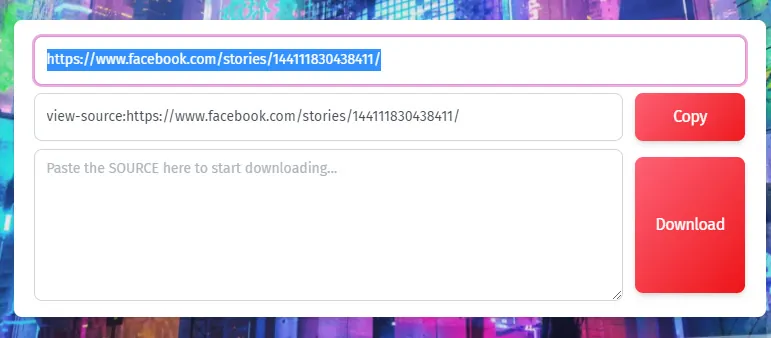
Access Developer Tools (Network Tab)
Return seamlessly to the Facebook interface. Right-click anywhere blank on the screen and choose "Inspect" (or manually press F12 on your keyboard). Navigate over to the "Network" tab.
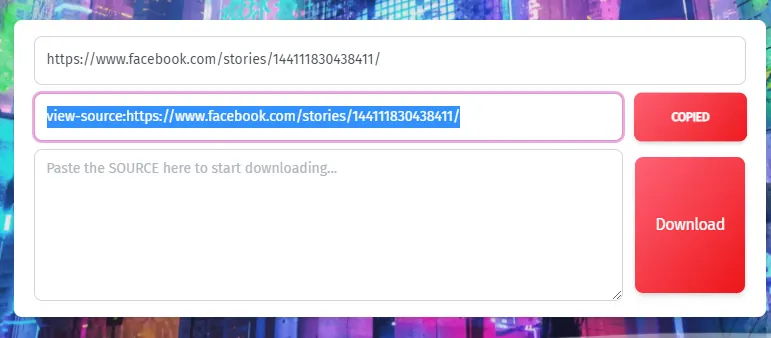
Locate the Story Document Link
Deep inside the active "Network" tab environment, locate a persistent document link usually starting entirely with "https://www.facebook.com/story.php?..." and deliberately copy it.

Copy the Entire Source Code
Open that newly acquired link locally in a fresh tab. Press Ctrl + A (or Command + A on Mac) to systematically select all of the page's source code, then quickly press Ctrl + C (or Command + C) to copy it.
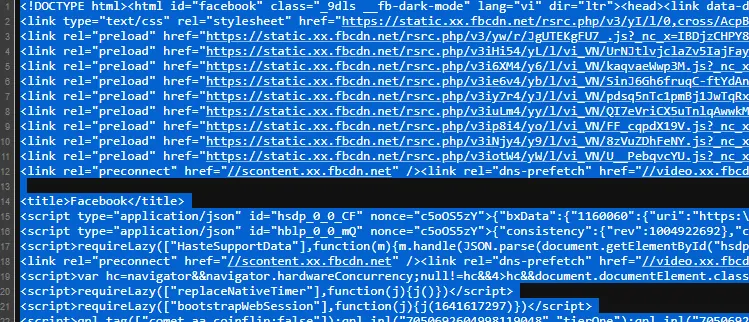
Paste Source Code into Downloader
Switch tabs back to our central downloader tool. Paste the entire bulk copied source code seamlessly into the provided secondary data extraction field.
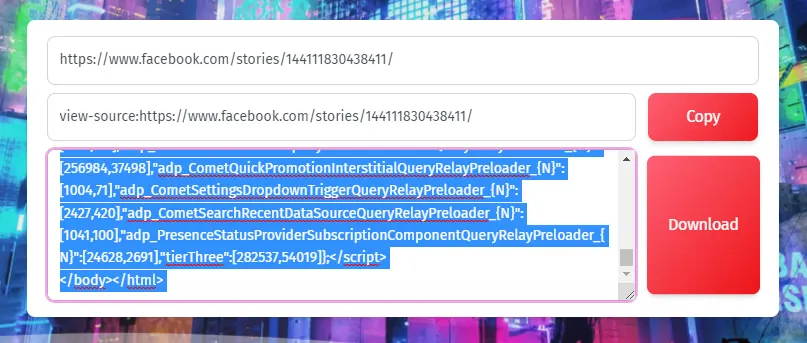
Select Quality & Download
Finally, strongly click the distinct "Download" button. Choose your genuinely preferred video resolution (HD, Full HD, 2K, or 4K), and the finalized file will be safely saved directly onto your device.
🎥 Comprehensive Video Tutorial
Watch Actionable Guidance
Prefer visual instructions? We've prepared a simple YouTube Shorts tutorial showcasing exactly how to capture network requests and download private timeline media flawlessly.
💎 Legal Disclaimer & Important Notes
User Responsibilities & Fair Use
This free application is intended exclusively for personal archiving and fair use purposes. Please rigorously respect the essential privacy and intellectual copyrights of independent content creators. Our technical development team is absolutely not legally responsible for any gross misuse of this tool for distributing unlicensed materials. Remember that maximum output resolutions are always intrinsically dependent on the native source quality uploaded onto Facebook's servers.
Ready to Save Your Favorite Moments?
Experience the fastest rendering tool on the market. Absolutely secure, ensuring your individual viewing remains entirely anonymous while reliably retaining native high resolution.
Frequently Asked Questions
To download private Facebook story videos, simply copy the URL of the story page, then utilize our completely free online FB downloader. Paste your link and carefully follow the steps to intercept network traffic and successfully download the high-quality MP4 file.
Absolutely not. Our robust private FB story saver utility is a 100% free premium service. You will never encounter hidden fees, premium subscriptions, or restrictive download limits when saving standard clips or HD reels.
No installation is required. Everything runs securely within your standard web browser. You can capture and download FB story segments instantly whether using Chrome, Safari, or Firefox without trusting suspicious third-party desktop applications.
Our advanced algorithm successfully parses multiple video formats directly from Facebook's servers. You can easily download Facebook story videos in crisp resolutions including 720p HD, 1080p Full HD, 2K, and ultra-sharp 4K depending on the uploader's original quality.
Yes, our utility handles complex privacy layers flawlessly. By utilizing the page source extraction method outlined in our tutorial, you can effortlessly download video stories sourced from any closed Facebook groups, restricted pages, or private friend profiles.
Your security is our absolute priority. We operate entirely via a cloud-based server approach, meaning we never require access to your Facebook login credentials or store any sensitive personal data while you save private Facebook videos locally.
No limits whatsoever. Users possess the complete liberty to process queries and download Facebook story videos an unlimited number of times daily. Build your comprehensive offline archive of special moments without worrying about arbitrary download caps.
Yes, every file you extract retains full multimedia properties. The final output file will seamlessly combine sharp video graphics with the original high-quality audio track precisely synchronized with the original FB story.
Thanks to our optimized network architecture, extracting links and saving files is incredibly fast. Most standard downloads take mere seconds, ultimately depending on your local internet connection velocity and the specific file size being handled.
Yes! While extracting source code is generally simpler on a desktop, our inclusive web application remains fully mobile-optimized. You can use our tool to download Facebook story videos seamlessly across iOS iPhones, Android smartphones, and portable tablets.
Popular Tools


