Dailymotion Downloader: Download Videos to MP4 in HD
Fast, simple Dailymotion video download — choose MP4 quality in seconds
Unlock Pro Features & Unlimited Downloads
Want a reliable way to save Dailymotion videos for offline viewing, sharing, or archiving? With BraveDown, you can use this Dailymotion Downloader to download in MP4 and pick the quality you need—without installing software.
Table of Contents
How to download Dailymotion videos
Step-by-step (fast and beginner-friendly)
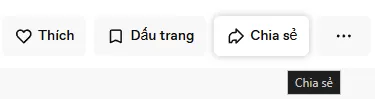
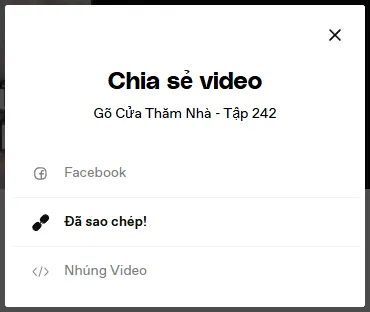
- Copy the video URL from Dailymotion (address bar or Share button).
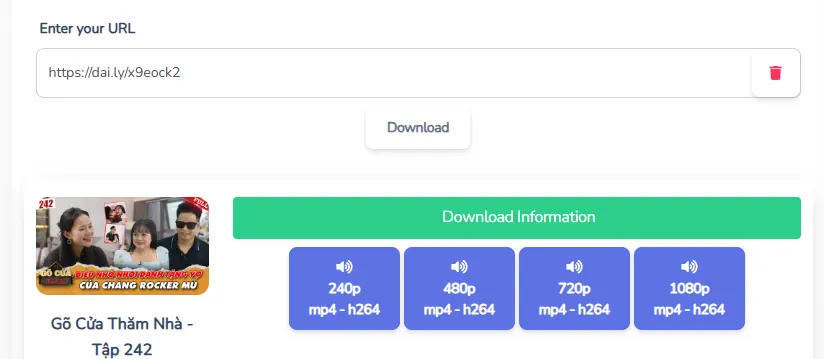
- Paste the link into BraveDown’s input box on this page.
- Click Download, then choose the resolution to save the MP4 file.
This Dailymotion Downloader is designed for common intent like dailymotion video download, download from dailymotion, or download dailymotion videos online—simple, direct, and focused on getting you the file.
Pro tips for cleaner results
- Use the full URL (avoid truncated links copied from some apps).
- Stable connection helps when selecting higher resolutions.
- Try another quality if a specific resolution isn’t available for that video.
Screenshots guide
Below are quick visuals that match the process: copy the link, paste it here, then download. Follow the screenshots to avoid missing any step.

Key features you’ll actually use
Made for everyday downloads
- Fast flow: paste link → choose quality → save file.
- Quality options: pick the best available resolution for your video.
- Works on devices: desktop, tablet, and mobile browsers.
- Privacy-focused: designed to avoid collecting unnecessary personal data.
Dailymotion to MP4: formats & quality tips
Many users specifically want dailymotion to mp4 because MP4 plays well on most devices and media players. With BraveDown’s Dailymotion Downloader, you can typically save a compatible file and choose a resolution that matches your needs.
Choose the right quality
- HD: good balance for most phones and laptops.
- Higher resolutions: better detail, larger file size.
- Lower resolutions: faster saves and smaller storage needs.
If a quality isn’t listed
The available options come from the source video. If you don’t see the resolution you want, try another Dailymotion video download link, or pick the highest available option shown after processing.
Looking for variations like download dailymotion video or download dailymotion videos? The steps stay the same—paste, process, and choose a format/quality.
How to get a Dailymotion video link
To download from Dailymotion, you’ll need the video’s full URL. A common format looks like: https://www.dailymotion.com/video/x8...
- Open the video page on Dailymotion.
- Copy the address from your browser bar (recommended).
- Paste it into the downloader input to start.
Troubleshooting & common issues
Link not working?
- Confirm the URL opens in your browser and is a Dailymotion video page.
- Remove extra characters (spaces, quotes) when pasting.
- Try refreshing the page and processing the link again.
Download is slow?
If you pick a higher resolution, file sizes can be bigger. Switching to a lower option may complete faster.
Also, if you’re using a mobile network, consider Wi-Fi for more stable Dailymotion video download performance.
Important notes
- Download content for personal use and respect creator rights.
- Some videos may be restricted by region, age, or permissions.
- If a video is removed on Dailymotion, it may no longer be available to process.
Wrap-up & CTA
BraveDown makes it easy to save videos with a clean, practical Dailymotion Downloader workflow—paste a link, select quality, and download.
Ready to start? Copy a Dailymotion link, paste it into the box above, and choose the MP4 quality that fits your device.
Frequently Asked Questions
A Dailymotion Downloader is an online tool that helps you save Dailymotion videos to your device for offline viewing. With BraveDown, you typically paste the video link, process it, and select an available quality to download the file in a compatible format.
To download Dailymotion videos online, copy the full Dailymotion video URL from your browser, paste it into the BraveDown Dailymotion Downloader input, then click Download. When options appear, choose the resolution you want and save the file to your device.
Yes, many people use a Dailymotion to MP4 workflow because MP4 works across most devices. Paste the Dailymotion link into BraveDown, then choose an available quality option. The exact formats and resolutions depend on what the original video provides.
BraveDown aims to provide quality choices where available, including HD options when the source video supports them. If you don’t see HD for a specific Dailymotion video download, try another video or select the highest quality shown after the link is processed.
Quality options come from the original Dailymotion upload and may vary by video. If the creator didn’t upload in Full HD or 4K, those choices won’t appear in the downloader. In that case, pick the best available resolution for your needs.
Downloaded files are usually saved to your browser’s default downloads folder on desktop, or your device’s download manager on mobile. If you can’t find them, check your browser settings for the download location or search your device for recent MP4 files.
Yes, a dailymotion downloader online tool is designed to work in modern mobile browsers on Android and iOS. For the smoothest results, use a stable connection, paste the full URL, and choose a resolution that matches your storage and playback needs.
First, make sure the link opens correctly as a Dailymotion video page. Then paste the entire URL (no spaces) and try again. If it still fails, refresh the page or try later—some videos can be restricted, unavailable, or temporarily hard to process.
Yes. BraveDown is built to support download from Dailymotion directly in your browser, so you typically don’t need to install apps or extensions. Just paste the video URL and choose the download option that fits your device and preferred quality.
Legality depends on the video’s copyright and the platform’s terms. Generally, downloading for personal use may be allowed in some cases, but you should respect creators’ rights and Dailymotion’s rules. Avoid re-uploading or commercial use unless you have permission.
Popular Tools


