Facebook Story Viewer: View & Download Photos and Videos
View available Facebook Story photos and videos from a link, then save supported files directly in your browser
Unlock Pro Features & Unlimited Downloads
Facebook Story Viewer for moments you want to revisit
A product demonstration, an event update, or a clip from your own campaign can be useful long after the first viewing. BraveDown Facebook Story Viewer gives you a browser-based way to access available Story photos and videos using a copied link.
Start with the Story URL, review the content the tool can retrieve, and choose an available download option if you want to keep a copy. There is no extra app to install. Whether you need an FB Story Viewer for a quick reference or want to save your own content, the process begins with the specific Story you want to access.
Get started with facebook story viewerYour guide to viewing and saving Stories
Choose the part that helps with your next step.
Make available Story content easier to review
A Facebook Stories Viewer is useful when you already have a particular update in mind. Working from its link keeps the task focused: find the relevant photo or video, check the result, and decide whether you need a saved copy.
Keep your campaign references together
Save supported Stories from your own campaigns while they remain available. A local copy can help you review the wording, creative direction, or sequence of a promotion when planning the next one.
Organization tip: Name saved files by campaign and date so they remain easy to identify.
Revisit details at your own pace
A short Story may contain several details worth checking, such as a product angle, a design reference, or an event announcement. Review the available result before deciding whether it is the material you intended to keep.
Review tip: Check the content itself before adding it to your reference folder.
Use a familiar browser workflow
BraveDown is designed around a link-based process on mobile and desktop browsers. You can approach a photo reference or video clip through the same basic steps, without installing a separate application. Available files still depend on the Story link and the content the service can access.
How to view or download Facebook Stories
Have the complete Story URL ready before you begin. A link to the specific item gives the tool the information it needs to attempt retrieval; a profile name alone is not the workflow described here.
- 01
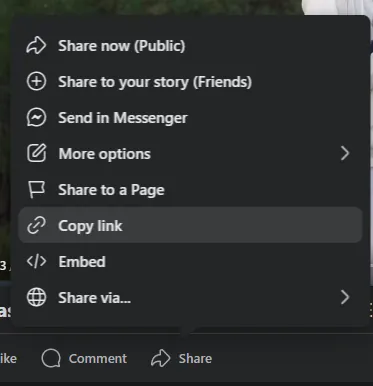
Copy the complete Story link
Locate the Story you want to view. If a copy-link option is available in its share or options menu, use it to capture the full URL. Keep the copied address intact rather than removing parts of it or replacing it with a general profile link.
Check that you selected the intended Story before moving on.
- 02
Paste the URL into BraveDown
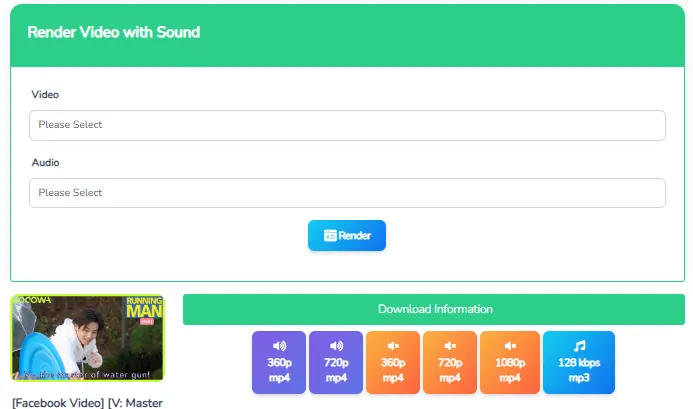
Enter the copied address into the tool's link field and start processing. If the URL is supported and the Story is accessible, review the returned photo or video. Make sure it matches your intended content before choosing a save option.
A copied link does not guarantee that its content can be retrieved.

- 03
Review the result and save a copy
Use an available download option for content you own or have permission to save. Once the download finishes, open the file to check that you have the expected photo or clip. Its quality depends on the accessible source, so assess the actual result before using it in another project.
Check your browser's download list if you cannot locate the saved file.
Anonymous viewing and HD quality: what to expect
Before using a viewer, separate the convenience of a browser-based process from claims about identity, access, or resolution. These are different questions, and a Story link alone does not answer them.
Can you view Facebook Stories anonymously?
If you searched for “facebook story viewer anonymous,” you may want to know whether the creator can identify your visit. The information provided for BraveDown does not establish an anonymity guarantee. Using a link-based viewer should not be treated as proof that a view is invisible or that activity cannot be recorded.
Will every download be Full HD?
Full HD is not guaranteed for every Story. The available resolution depends on the original upload and the source file the tool can retrieve. Downloading a lower-resolution clip does not automatically restore missing detail. If quality options appear, choose the one that suits your intended use and inspect the saved result.
What about restricted content?
Private, restricted, removed, or expired Stories may be unavailable. Do not assume the viewer can bypass those limits or recover a missing item. For content from another creator, get permission before saving or reusing it; a visible link is not a statement about how they want their work used.
Why is your Facebook Story link not working?
An unsuccessful Facebook Story download can have several causes. Check the link and content availability first, then look at the browser or saved file. This helps you identify which part of the process needs attention.
The tool does not return a result
Copy the complete Story link again and check for accidental spaces or missing text. Confirm that the address belongs to the intended Story rather than a different page.
The original Story is no longer available
Check whether the creator removed the Story or whether it expired. Repeatedly submitting the same address does not establish that unavailable content can be recovered.
You can open the Story, but the viewer cannot
Content visible through your Facebook account may have audience restrictions. Access in your own session does not establish that a separate browser-based service can retrieve the same material.
The page stalls or the saved file is hard to find
Try reloading the tool or using another updated browser for a temporary loading issue. If a download has already started, inspect the browser's download list for its progress and location.
Put your Story link to work
Have a photo or video you want to revisit? Start with its complete URL and review what BraveDown can retrieve. For the saving workflow, use the Facebook Story Downloader to check available files for content you own or have permission to keep.
Keep the process simple: choose the right Story, inspect the result, and save the supported file that meets your needs.
Follow the three-step guideFrequently Asked Questions
A Facebook Story Viewer is a tool that uses a Story link to retrieve available photo or video content for viewing in a browser. BraveDown follows this link-based workflow and offers save options when the content and source format are supported.
Copy the complete link for the Story you want to access, paste it into BraveDown, and start processing. If the tool retrieves a result, check that it matches the intended photo or video, then choose an available download option when appropriate.
The supplied information does not confirm that BraveDown provides anonymous viewing or prevents a creator from identifying a visit. A link-based workflow alone is not an anonymity guarantee. Do not assume that using a separate viewer makes your activity invisible or overrides access restrictions.
BraveDown is designed to process available Story photos and video clips from a link. Whether you receive a downloadable result depends on the URL, content availability, source format, and access restrictions. Review the returned file and save content you own or have permission to keep.
No additional app is needed for the browser-based workflow described here. Open BraveDown in a supported browser, provide the complete Story URL, and review the available result. Viewing or saving a particular item still depends on whether the tool can retrieve that content.
Yes. BraveDown's browser-based workflow is intended for mobile phones as well as tablets and desktop computers. Paste the complete Story link and review any available result. If you save a file, check your browser's download list to locate it on your device.
The link may be incomplete, the Story may have expired or been removed, or access may be restricted. Copy the original Story URL again and check that the content remains available. If the tool itself stalls, reloading it or trying another updated browser may help.
Full HD is not guaranteed. Download quality depends on the original Story upload and the source file available to the tool. A lower-resolution source will not automatically gain detail through downloading. Review any quality options offered and inspect the saved photo or video before reusing it.
Do not assume that it can. Private or audience-restricted Stories may be inaccessible to the service, while expired or removed content may no longer be available. A copied URL does not guarantee retrieval, and the described workflow does not establish any ability to bypass restrictions or recover missing Stories.
Saving your own available Stories can help you organize personal highlights or campaign materials. For another creator's content, obtain permission before saving or reusing it. Keep that permission specific to your intended use rather than assuming that an accessible Story is meant for redistribution.
Popular Tools


