Kuaishou Video Downloader Without Watermark
Paste a Kuaishou link to save clean videos fast on any device
Unlock Pro Features & Unlimited Downloads
Need a simple way to save short videos from Kuaishou or Kwai? BraveDown gives you a clean, browser-based Kuaishou video downloader that helps you paste a link, download a file without watermark, and keep the clip ready for offline viewing on mobile or desktop.
This guide explains how a Kuaishou video download works, what benefits users usually expect, and which usage tips matter before you save or share any clip.
Explore This Guide
Jump to the section you need and move through the page with quick anchors.
What a Kuaishou Video Downloader Does
Kuaishou, also known as Kwai in some markets, is built around fast-moving short videos, trends, and creator content. A Kuaishou video downloader helps users save a public video link to their device so they can watch it later, organize reference material, or keep a clean copy for personal viewing when they do not want the platform watermark covering the frame.
For many users, the value is not only speed but also convenience. Instead of installing extra software, opening multiple tabs, or screen recording with lower clarity, a Kuaishou video downloader online tool keeps the workflow simple: copy the link, paste it, choose the available output, and save the video file.
This is especially useful for people who collect tutorials, comedy clips, visual inspiration, fashion references, food ideas, or creator examples they want to revisit without searching again inside the app.
How to Download Kuaishou Videos
Find the video you want to save
Open Kuaishou or Kwai, then choose the clip you want to keep for offline viewing. Make sure the link points to the exact video you plan to download so the tool can process it correctly.
Copy the video link
Tap the share option inside the app or on the video page, then choose the copy-link action. This is the key step for any Kuaishou video download because the tool needs the original URL to detect the media.

Paste the URL into the downloader
Return to the tool page and paste the copied link into the input box. A reliable Kuaishou downloader should make this step easy on both desktop and mobile browsers, with no complicated setup.

Choose the available format or quality
If the tool shows output options, pick the version that matches your needs. Some users want a quick standard file for sharing, while others prefer the best available quality for editing, archiving, or larger-screen playback.
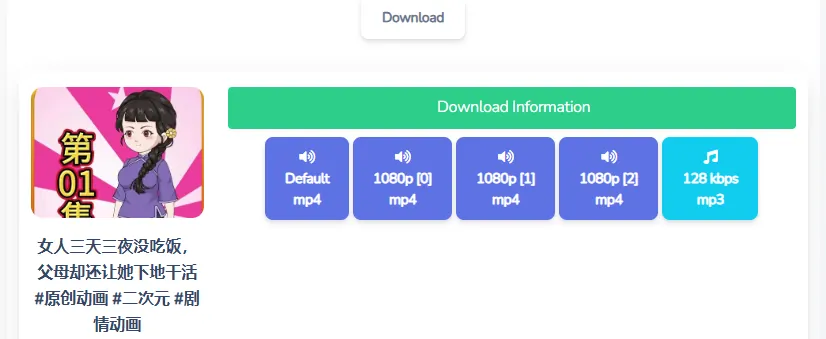
Start the download and save the file
Press the download button and wait for the file to be prepared. Once complete, the video is usually saved to your device downloads folder or to the location selected by your browser settings.

Why People Download Kuaishou Videos Without Watermark
Cleaner viewing experience
A file without watermark can feel less distracting when you watch it on a bigger screen, save it in a personal library, or show it during a casual presentation.
Offline access anytime
Downloaded clips are useful when your connection is unstable, when you travel, or when you want to revisit a tutorial or reference video without opening the app again.
Faster reuse for personal projects
Users often save examples for mood boards, editing practice, reaction concepts, trend research, or creative inspiration. A clean file can be easier to review frame by frame.
Simple cross-device workflow
When a tool works in the browser, you can move from phone to tablet to desktop without changing your habit. That flexibility is a major reason people choose an online Kuaishou video downloader.
These benefits are practical, but they also come with responsibility. Downloaded content should be handled with respect for creators, platform rules, and the rights connected to the original video.
What to Expect From the Tool
Browser-based use
You can start a Kuaishou video download directly in a web browser, which is convenient for quick one-time saves and for users who do not want extra installation steps.
Works across devices
A flexible Kuaishou downloader should feel easy to use on Android, iPhone, tablets, Windows laptops, and Mac devices, as long as a modern browser is available.
Quality that matches the source
When the original upload is clear, users generally expect the saved file to preserve a strong viewing result. This matters for tutorials, product demos, travel clips, and creator references.
Less friction for everyday tasks
Whether you are saving a funny clip, an editing reference, or a recipe idea, the best experience is fast, clear, and easy to repeat without extra technical steps.
Important Notes Before You Save
Use downloaded videos responsibly. Saving a clip for personal viewing, offline access, or temporary reference is very different from reposting someone else’s work as your own or using it in commercial material without permission.
If a link does not work, check whether you copied the full video URL, whether the post is still public, and whether the browser pasted extra characters. In many cases, a clean link solves the issue faster than repeating the same action several times.
If you want a fast, simple workflow, the easiest next step is to open the tool, paste your link, and start the process from there.
Frequently Asked Questions
Copy the Kuaishou or Kwai video link, paste it into the downloader input box, then start the download. A browser-based tool is useful because it keeps the process simple on desktop and mobile without adding extra software.
Yes, this page is optimized for users who want to save a Kuaishou video without watermark. The typical workflow is to paste the original URL, let the tool detect the media, and then download a cleaner file for offline viewing.
No installation is required in the intended workflow. The Kuaishou downloader is designed to work directly in a browser, which makes it easier for users who only need a quick video save from time to time.
Yes, a browser-based downloader can be used on phones, tablets, laptops, and desktop computers. As long as you can open the video, copy the link, and access the webpage, the process should feel similar across devices.
The final quality usually depends on the source video and the output options available in the tool. If the original Kuaishou upload is clear, users can generally expect a strong viewing result for offline playback or personal reference.
The most common reasons are an incomplete URL, a private or unavailable post, or extra characters copied with the link. Try copying the video address again directly from Kuaishou or Kwai, then paste only the clean link into the downloader.
Yes, offline viewing is one of the main reasons people use a Kuaishou video downloader. Saving a clip locally helps when you travel, lose connection, or want quick access to tutorials, recipes, or creator examples later.
Kuaishou and Kwai refer to the same short-video ecosystem, with Kwai commonly used as the international name in some markets. That is why many users search both terms when looking for a video downloader or a no-watermark saving tool.
You can technically save and move the file, but sharing should always respect creator rights, platform rules, and local copyright requirements. A clean file is convenient, but permission still matters if the content goes beyond personal use.
Commercial use should be treated carefully. If the video belongs to another creator, you may need permission or a proper license before using it in ads, branded edits, monetized channels, or client work, even if the file was easy to download.
Popular Tools


