Reddit Video Downloader with Audio – Fast, Free HD Downloads
Download Reddit Videos with Audio, GIFs, and HD Quality Easily
Unlock Pro Features & Unlimited Downloads
Reddit Video Downloader for Videos, GIFs, and Audio
Found a Reddit post worth keeping? Use a simple link-based workflow to save videos, GIFs, or available audio for later viewing, sharing, and personal creative reference.
Make great Reddit finds easier to revisit
Reddit moves quickly. A useful tutorial, a memorable clip, or a discussion with valuable context can become difficult to find again after new posts appear. Downloading media for personal access can make future viewing more convenient.
A reddit video download workflow is especially practical when you want to view content offline, collect references for a project, or send a file to someone who cannot easily access the original post.
Offline convenience
Access saved media when streaming is not the most practical option.
Simpler sharing
Keep a file ready when sharing a favorite moment with friends or colleagues.
Personal archive
Organize clips and GIFs you may want to revisit later.
Creative reference
Save inspiration for edits, presentations, memes, or personal ideas.
What a reliable Reddit downloader should help you do
The best experience is clear, flexible, and focused on the original post link rather than a complicated setup.
Video and GIF options
Save supported Reddit videos and GIFs from the post you choose.
Audio when available
A download Reddit video with sound option is useful when the source includes audio.
Device-friendly access
Use a browser-based process across desktop, tablet, or mobile devices.
Quick link workflow
Copy the post URL, paste it into the tool, and continue with the available choices.
Quality selection
Choose from the formats or quality options offered for the source media.
Easy for anyone
No complicated technical process is needed to get started with a Reddit downloader.
How to download Reddit videos with audio
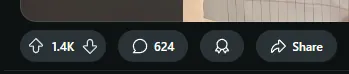
Copy the post link
Use Reddit's Share option or copy the URL from your browser's address bar.
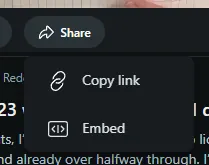
Copy the post link
Select Copy Link after opening the Share menu to capture the URL of the specific Reddit post.
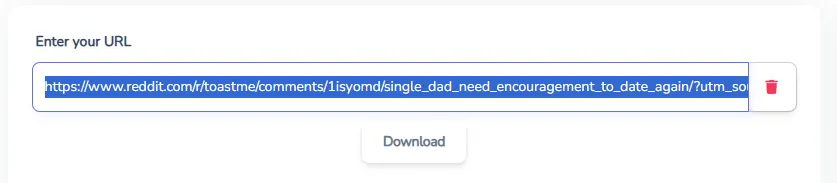
Paste the URL
Enter the copied post URL into the downloader input field and submit it for processing.
Download on Android
Open the post in the Reddit app, use the three-dot menu or Share option to copy its link, then paste it into your browser-based downloader. Choose an available option and save the resulting file.
This method helps when you want to download Reddit videos without needing to switch to a desktop device.
Download on iPhone or iPad
From the Reddit app, copy the link to the specific post. Open your preferred browser, paste the link into the downloader, and follow the offered download instructions.
File-saving behavior can vary by browser and device settings, so check your Downloads location after the process is complete.
Use the post URL, not a general Reddit page
For the smoothest result, copy the link from the post that contains the media. The Share button is generally the easiest way to capture the correct address on desktop and mobile.
- Use a link to one specific post
- Check that the post is still available to view
- Try copying the URL again if a pasted link does not work
Looking for a simple tool?
Visit reddit-downloader to begin with a clean, post-link-based experience.
If a post is private, removed, or restricted, its media may not be available for download.
Use downloaded content responsibly
Downloaded Reddit media should be handled with respect for the original creator, applicable copyright rules, and the context in which the content was shared. Personal viewing and reference are different from redistributing or reusing someone else's work.
Before using a clip in public, commercial, or edited content, seek permission when needed and follow the relevant platform rules. A thoughtful download Reddit video process protects both your workflow and the people who created the content.
Save the Reddit media you want to revisit
Copy the post link, choose the available media option, and create a more convenient way to access your favorite videos, GIFs, and audio.
Start Your DownloadFrequently Asked Questions
Open the Reddit post containing the video, copy the post link, and paste it into a Reddit video downloader. If the source includes audio and the downloader offers an audio-enabled option, select it before saving the file to your device.
A browser-based downloader may work without a Reddit account when the post is publicly accessible. Private, deleted, restricted, or otherwise unavailable posts may not be processed because their media cannot be accessed through a public post link.
Copy the link to the individual Reddit post that contains the media. Use the Share button on desktop or mobile, or copy the browser address while viewing the specific post. Avoid copying a general subreddit or feed URL.
Yes, supported GIF posts can be handled in a similar way to video posts. Copy the specific Reddit post URL, paste it into the downloader, and choose an available download option for the media shown in that post.
Yes. On Android, iPhone, or iPad, copy the Reddit post link from the app and open the downloader in your mobile browser. Paste the link, select an available format, and follow the device download prompt.
The link may point to a feed instead of the post, or the post may be deleted, private, restricted, or unavailable. Copy the post URL again using the Share button and confirm that the original post still opens normally.
Available quality choices depend on the original media and the downloader’s supported output options. When multiple choices appear, select the format or resolution that best balances file size and viewing quality for your device.
Downloads commonly appear in your browser’s default Downloads folder. On mobile devices, the location can depend on browser and system settings. Check the browser download manager, Files app, or gallery if you cannot find the saved file.
If the post contains video with an audio track and the tool provides an audio-only option, you may be able to save the sound separately. Availability depends on the original post media and the formats supported by the downloader.
Always respect the original creator’s rights and the context of the post. Downloading for personal access does not automatically grant permission to repost, edit, distribute, or use media commercially. Ask permission when your intended use requires it.
Popular Tools


