Free Vimeo Downloader — Save HD, 4K & 8K Videos Instantly
Save Vimeo Videos Free — HD, 4K & 8K Quality
Unlock Pro Features & Unlimited Downloads
Vimeo is the go-to platform for high-quality creative video — short films, documentaries, music videos, and professional portfolios. BraveDown Vimeo Downloader lets you download any Vimeo video to your device in seconds: no software installation, no account required, no download limits. Just paste the video URL and choose your preferred resolution — from SD all the way up to crisp 4K and 8K.
🚀 How to Use Vimeo Downloader
Saving a Vimeo video with BraveDown takes under a minute. Follow these four steps:
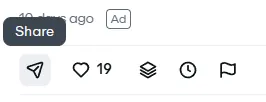
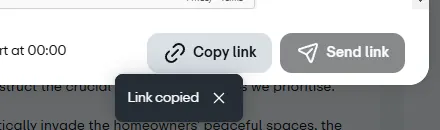
Copy the Vimeo Video URL
Open Vimeo.com, navigate to the video you want to download, then copy its full URL from your browser's address bar.
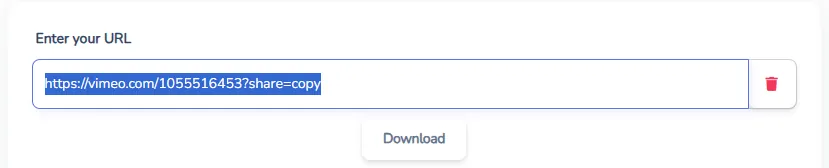
Paste the URL into BraveDown
Return to the BraveDown Vimeo Downloader page and paste the copied URL into the input box at the top of the page.
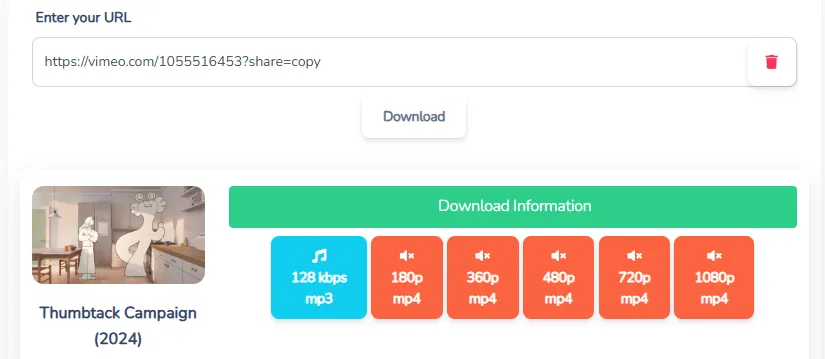
Select Your Preferred Quality
After the tool processes your link, it displays all available quality options — SD, HD, Full HD, 4K, or 8K. Pick the resolution that suits your needs.
Click Download & Save
Hit the Download button next to your chosen quality. The video saves directly to your device — no redirect, no waiting screen.
✨ Key Features of BraveDown Vimeo Downloader
Here is what sets this free Vimeo video downloader apart from the rest:
Lightning-Fast Downloads
Process and save Vimeo videos at maximum speed, no throttling, no queues.
Full Quality Preserved
Download Vimeo HD videos up to 4K and 8K — exactly as the creator uploaded them.
Free & Unlimited
No download caps, no sign-up, no subscription. 100% free for everyone.
All Devices Supported
Works on desktop, Android, and iOS — any browser, any OS, no app needed.
Private & Secure
We never collect or store your personal data or video URLs after processing.
Zero Ads & Interruptions
No pop-ups, no redirects, no annoying ad overlays disrupting your workflow.
Private Video Support
In some cases, downloading private Vimeo videos is supported when you are already logged into your Vimeo account in the same browser. Note: compatibility depends on the video's privacy settings.
🔗 How to Get a Vimeo Video Link
To save a Vimeo video, you first need its exact URL. Vimeo video links typically follow one of these formats:
- Standard video page URL:
https://vimeo.com/XXXXXXXXX - Embedded player URL:
https://player.vimeo.com/video/XXXXXXXXX
Always copy the full URL directly from your browser's address bar. Shortened or shared links may not work correctly with the downloader.
🌟 Why Use BraveDown to Download Vimeo Videos?
Vimeo is celebrated for its premium video quality — and that's exactly why having a reliable way to save those videos offline matters. Here are the most practical reasons users reach for a fast Vimeo downloader online:
Offline Viewing
Watch your saved Vimeo videos during flights, commutes, or any time without a stable internet connection.
Save Mobile Data
Download once over Wi-Fi and replay as many times as you like without burning through your 4G/5G data plan.
Education & Research
Keep lecture recordings, conference talks, and tutorial videos in a personal library for focused study sessions.
Content Creation
Reference or edit footage for creative projects — always respect copyright and obtain permission when required.
Prevent Content Loss
Videos on Vimeo can be removed or made private at any time. A local copy ensures you always have access.
Share with Colleagues
Build a curated video collection and share inspiring Vimeo content with teammates or study groups easily.
🎬 Supported Formats & Video Quality
BraveDown detects and presents every quality stream available for a given Vimeo video. The options you see depend on what the uploader originally published:
Output format: MP4 (universally compatible with all major media players and devices).
❗ Important Note on Copyright
Download Responsibly
- Use BraveDown Vimeo Downloader for personal, non-commercial purposes only.
- Always respect the intellectual property rights of video creators. Do not redistribute, sell, or republish downloaded videos without explicit permission from the copyright holder.
- When in doubt, contact the creator directly or refer to Vimeo's Terms of Service for guidance.
Ready to Save Your Favorite Vimeo Video?
Paste any Vimeo URL above and get your video in the quality you deserve — instantly, freely, and without clutter.
Use BraveDown Vimeo Downloader FreeFrequently Asked Questions
BraveDown Vimeo Downloader is a free online tool that lets you save any public Vimeo video directly to your computer, phone, or tablet — no software installation required, no account needed, and no download limits.
Copy the video URL from Vimeo.com, paste it into the BraveDown input field, wait for the tool to detect available quality options, select your preferred resolution (HD, 4K, etc.), and click Download to save the file to your device.
Yes. BraveDown supports all resolutions offered by the original video, including SD, HD (720p), Full HD (1080p), 4K, and 8K Ultra HD — giving you the sharpest possible offline copy.
No. You can download as many Vimeo videos as you like without hitting any daily or monthly cap. The service is completely free and unlimited.
Yes, BraveDown is 100% free. There are no hidden fees, premium tiers, or paywalls. You do not need a credit card or subscription to use it.
Absolutely. BraveDown works in any modern mobile browser on Android and iOS devices. No app installation is needed — just open the website, paste the URL, and download.
No software or browser extension is required. BraveDown is an entirely web-based Vimeo video downloader — just visit the page and you are ready to go.
Downloaded files go to your browser's default download location, which is typically the 'Downloads' folder on desktops or a dedicated media folder on mobile devices. You can change this in your browser's settings.
Yes. BraveDown does not collect, store, or share your personal information or the video URLs you submit. Your session data is processed in real time and discarded immediately after delivery.
Downloading for personal, non-commercial use is generally acceptable, but redistributing, selling, or publicly sharing downloaded videos without the creator's permission is a copyright violation. Always check the video's license and Vimeo's Terms of Service before downloading.
Popular Tools


