Xiaohongshu Video Downloader – Save Videos Without Watermark
Save public XHS & Redbook videos without watermark in HD or 4K when available — free online, no install
Unlock Pro Features & Unlimited Downloads
XHS & Redbook Downloads
A Cleaner Way to Save Xiaohongshu Videos Online
Xiaohongshu, also known as XHS, Redbook, or Little Red Book, is home to short-form videos covering beauty, fashion, food, travel, product discovery, tutorials, and everyday lifestyle content. When you want to keep a public video for offline reference, a dedicated Xiaohongshu video downloader offers a more convenient workflow than screen recording.
BraveDown is designed to process supported public Xiaohongshu links directly in the browser. Copy a share URL, paste it into the downloader, review the available result, and save the video to your device. When a clean source and higher-resolution stream are available, you can download the corresponding watermark-free HD or 4K version.
Built for a simple paste-and-save workflow
There is no need to capture your screen, crop interface elements, or manually separate the video from the Xiaohongshu app. Start with the original public share link and let the downloader identify the downloadable media options.
Responsible use: Download only content you are permitted to save. A watermark-free file does not transfer copyright or reuse rights. Respect the original creator's work, platform rules, and any permissions required before reposting or using content commercially.
Why Use a Xiaohongshu Video Downloader?
Screen recording can capture menus, notifications, playback controls, and other unwanted interface elements. A purpose-built XHS downloader starts from the public video link instead, creating a cleaner and more repeatable way to save supported content.
Watermark-Free Results When Supported
For supported public posts, BraveDown can provide a clean video result without the visible Xiaohongshu creator overlay. This is useful when you need an uncluttered file for personal reference, study, or an authorized editing workflow.
Keep the Available Source Quality
Available resolutions depend on the original video and the media streams Xiaohongshu exposes for that post. If an HD or 4K version is available to the downloader, you can select that higher-quality option before saving.
No Dedicated App Required
The workflow runs through a modern browser, so you do not need a separate desktop application, browser extension, or unofficial mobile APK just to process a Xiaohongshu share link.
Short, Repeatable Workflow
Copy, paste, process, and save. The workflow is easy to repeat when you are archiving several public references one after another.
Original Audio Included
When the source stream contains audio, the saved video can include its original soundtrack, voiceover, or other audio associated with that source.
Three-step tutorial
How to Download Xiaohongshu Videos
The same general process works whether you are using Xiaohongshu on a phone or opening a supported link from a desktop browser. Start with the official share function so you have the complete URL before submitting it.
Copy the Xiaohongshu Share Link
Open the Xiaohongshu or Redbook post you want to save. Use the platform's Share option and choose Copy Link. Copying from the official share menu reduces the chance of submitting an incomplete or manually edited URL.

Paste the Link into the Downloader
Paste the copied URL into the input field and start processing. The tool checks the submitted public link and, when the post is supported and accessible, displays the video option or options it can retrieve.
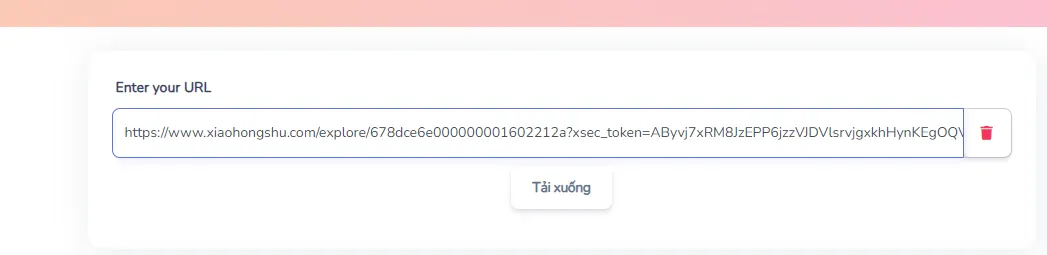
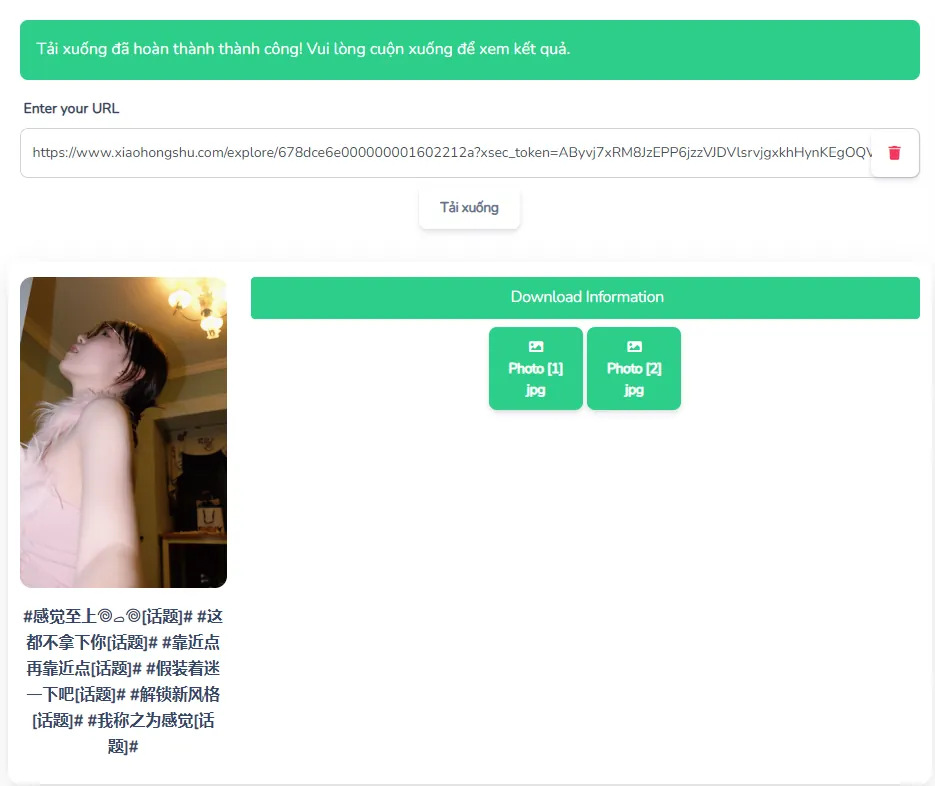
Choose the Available Quality and Save
Review the available result and select the quality you prefer. If the source offers Full HD or 4K through the supported stream, choose that version. Your browser then handles the file according to its normal download behavior and device settings.
Mobile download tip
On iPhone or iPad, downloaded files may first appear in Safari's Downloads area or the Files app rather than immediately inside Photos. On Android, browser downloads commonly appear in the Downloads folder and may also become visible in your gallery depending on the browser and device configuration.
XHS, Redbook and Little Red Book Downloads
Xiaohongshu is the platform's Chinese name, while XHS, Redbook, and Little Red Book are names commonly used when discussing the same service in English. As a result, people searching for a Redbook video downloader or an XHS video downloader are usually looking for the same basic workflow.
BraveDown can work with supported share-link formats associated with Xiaohongshu posts. The important factor is not which English name you use, but whether the submitted post is publicly accessible and the URL can be processed successfully.
Personal Reference Library
Keep permitted copies of useful travel guides, recipes, product demonstrations, fashion references, design inspiration, or other material you want to review later without repeatedly searching for the original post.
Offline Learning and Study
Tutorials and demonstrations can be easier to study when you have authorized offline access. Pause, replay, take notes, and organize useful references around your own learning workflow without relying on a continuous connection.
Creative and Market Research
Marketers, designers, and creators may keep permitted reference material to study pacing, framing, visual trends, product presentation, hooks, or storytelling techniques. Downloading a reference does not itself grant permission to republish it, so original content rights still need to be respected.
Troubleshooting Xiaohongshu Download Problems
A failed Xiaohongshu download video request does not always mean the downloader itself is unavailable. Accessibility, URL formatting, or changes to the original post can also affect whether media can be retrieved.
Ready to Save a Public Xiaohongshu Video?
Copy the public XHS or Redbook share link, submit it, and choose the available video quality that fits your needs. No separate downloader application is required for the browser-based workflow.
For a quick paste-and-save workflow, open the Xiaohongshu video downloader and paste your public video link.
Frequently Asked Questions
Copy the public video's share link from Xiaohongshu, paste it into the BraveDown downloader, and start processing the URL. When a supported watermark-free source is available, select the video result and save it to your device. The workflow runs in the browser, so you do not need to install a separate application or extension.
Yes. The downloader is designed to work through modern mobile browsers, including browsers on iPhone, iPad, and Android devices. Paste the Xiaohongshu share link into the input field and download the available result. Depending on your device, the finished file may appear in Downloads, Files, your browser's download manager, or your media gallery.
HD or 4K availability depends on the original post and the media streams that can be retrieved from that source. If a higher-resolution version is available, the downloader can present it as an option. If only a lower resolution appears, the tool cannot manufacture additional detail or create a true 4K version from a lower-quality source.
No dedicated downloader application is required for the standard workflow. BraveDown runs through the browser, allowing you to copy a public Xiaohongshu link, paste it into the downloader, process the post, and save an available video result. This also means you can use the same basic process across phones, tablets, laptops, and desktop computers.
These names generally refer to the same platform. Xiaohongshu is the Chinese name, XHS is a common abbreviation, and Redbook or Little Red Book are frequently used English references. Because they refer to the same service, users searching for an XHS downloader or Redbook video downloader are usually looking for the same type of video-saving workflow.
A download can fail when a post is private, restricted, deleted, no longer publicly accessible, or submitted with an incomplete URL. Copy the share link again from the official Xiaohongshu share menu and retry it. If the creator has removed access to the underlying public video, the downloader may not be able to retrieve that media.
After processing the share link, choose the available video result and use your browser's normal download action. On iPhone or iPad, the file may first appear in Safari's Downloads area or the Files app. On Android, downloaded media commonly appears in the Downloads folder and may also become visible in the Gallery after the download finishes.
You can process additional public links by completing one download and then submitting the next Xiaohongshu URL. Using separate links one at a time also makes it easier to confirm that each post is accessible and that you are selecting the intended result. Availability can vary between posts because each video has its own source and access conditions.
Downloading a video does not automatically give you permission to republish, modify, distribute, or commercially use somebody else's content. Copyright and platform rules may still apply even when a watermark-free copy is available. Before reposting, check the creator's permissions and any relevant usage rights, and provide attribution when it is required or appropriate.
When the accessible source video contains audio, the downloaded file can retain the audio included with that source, such as music, speech, voiceovers, or sound effects. If the source itself is muted, restricted, or provided without an audio track, the downloader cannot restore audio that is not present in the available media stream.
Popular Tools


