Weibo Video Downloader: Download HD MP4 Without Watermark
Fast Weibo Video Downloader – HD MP4 Without Watermark
Unlock Pro Features & Unlimited Downloads
Download Weibo Videos in HD MP4 with Less Friction
A weibo video downloader gives you a straightforward way to save publicly accessible Weibo videos for offline viewing. Instead of installing additional software, you can copy a video link, paste it into BraveDown, review the available output options, and save the MP4 file to your device.
The workflow is designed for users who want to archive a useful tutorial, keep a reference video, or save content they have permission to download. When a clean source stream is available, the resulting file may also be offered without an added platform watermark.
Simple workflow
Link → Process → Save
On this page
Explore This Weibo Download Guide
Why Use a Browser-Based Weibo Video Downloader?
A good Weibo downloader should reduce unnecessary steps rather than complicate a simple task. BraveDown focuses on the essentials: accept a public video URL, detect the media options made available by the source, and present those options in a format that is easy to save.
MP4 for Convenient Playback
MP4 is widely supported by modern browsers, phones, tablets, computers, and many media applications. When an MP4 source is available, it gives you a practical file for offline viewing without adding an unnecessary conversion step.
Keep the Available Video Quality
If the source provides multiple quality options, you can choose the version that best suits your needs. An HD result depends on the quality and streams available from the original Weibo post, so the downloader does not need to invent resolution that is not present at the source.
Desktop and Mobile Friendly
Because the process runs through a web interface, you can access it from a modern browser on a desktop computer or mobile device. The final save location can vary by browser and operating system, particularly on iPhone and iPad.
Clean Source When Available
Users often search for a Weibo video downloader without watermark. A clean result may be possible when Weibo exposes a video stream without a separately added overlay. If a logo or watermark is permanently encoded into the video frames, a normal downloader cannot simply separate it from the footage.
You Do Not Need to Navigate Weibo in Chinese
The phrase 微博视频下载 means “Weibo video download.” Regardless of the language used on the original post, the basic workflow remains the same: locate a publicly accessible video, copy its link, and submit that URL to the downloader.
How to Download Weibo Videos in 4 Steps
You only need the link to a publicly accessible Weibo post. Before copying it, confirm that the video itself loads normally; this helps distinguish a downloader problem from a post that is private, unavailable, or already removed.
Open the Weibo Post
Find the post containing the video you want to save and open the post itself rather than relying on a feed preview. Make sure the video is publicly viewable and starts playing normally.

Copy the Complete Video Post URL
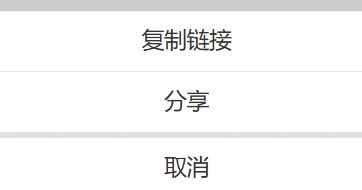
On desktop, copy the full address from the browser's address bar after opening the post. On mobile, use Weibo's sharing controls and choose the option that copies the post link.
Avoid copying only the caption, username, or unrelated text around the post. The downloader needs a recognizable URL to locate the media.
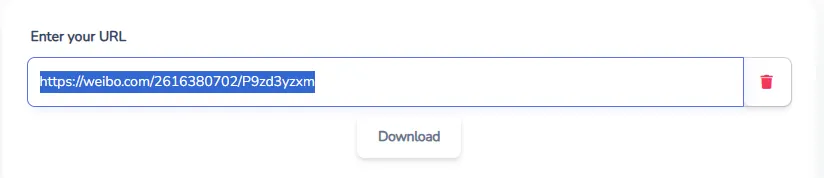
Paste the Link into the Downloader
Return to BraveDown and paste the URL into the downloader field. The service can then inspect the public media information associated with that link and identify the download options available for the post.
If processing fails, open the copied URL in another browser tab first. If the post itself does not load, copying a fresh link is a useful first troubleshooting step.
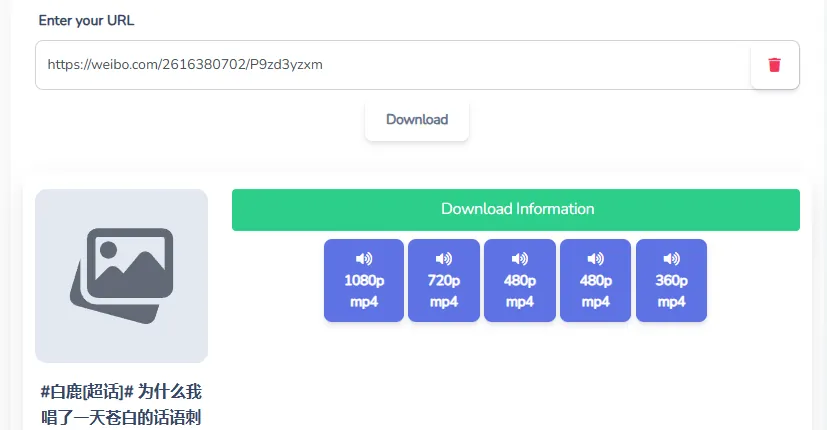
Choose an Available Quality and Save
Review the options returned for the video and choose the MP4 quality that fits your preference. If an HD stream is available from the source, select it before starting the save.
Your browser controls where the final file is stored. Desktop browsers commonly use a Downloads folder, while mobile browsers may provide their own download manager or file-saving interface.
Common Weibo Video Download Issues
When a Weibo video download does not work as expected, the URL and accessibility of the original post are the best places to start. The following checks can help isolate the problem without repeatedly submitting the same invalid link.
The URL Is Incomplete
Copy the link again directly from the post or browser address bar. Extra text from a share message can also cause confusion, so submit the actual URL rather than the entire copied message.
The Post Is Private or Unavailable
A downloader that works from public URLs cannot retrieve media that requires access it does not have. The same limitation applies when the post has been deleted or is no longer available at the copied address.
The Link Processes Incorrectly
Confirm that the original video still plays, refresh the downloader page, and paste a freshly copied URL. A changed post structure or temporary availability issue can also affect whether media options are detected.
A No-Watermark Version Is Not Listed
A downloader can only work with the media streams it can access. If a watermark is permanently embedded into the frames of the source video, selecting another download option will not automatically remove it.
Download Responsibly
Saving a video does not transfer ownership or copyright. Use downloaded material in accordance with the creator's permissions and any rights that apply to the content. If you intend to republish, modify, redistribute, or commercially use someone else's video, confirm that you have the necessary authorization first.
Ready to Save a Public Weibo Video?
Copy the URL of the public Weibo post you want to save, paste it into the downloader above, and review the MP4 options available from the source. For the best chance of success, use the complete post link and confirm that the original video is still accessible before processing it.
Frequently Asked Questions
Open the public Weibo post containing the video and copy its complete URL. Paste that link into the downloader, allow it to detect the media options available from the source, and choose the MP4 quality you prefer. Your browser will then handle the file download and determine where it is saved on your device.
Yes, when an HD stream is available from the original Weibo post. The downloader can present the quality options it detects from the source, allowing you to select an HD MP4 when one is provided. It cannot create genuine additional resolution if the original video was uploaded or made available only at a lower quality.
BraveDown does not require you to create a BraveDown account before using its web-based downloader. The Weibo post itself must still be publicly accessible through the submitted link. Content hidden behind privacy restrictions, removed by its publisher, or otherwise unavailable cannot normally be retrieved through a public URL downloader.
A no-watermark result may be available when the source exposes a clean video stream that does not contain a permanently embedded watermark. If a logo or watermark has already been encoded directly into the frames of the original media, a standard downloader cannot simply separate that visual element from the underlying video.
First check whether the copied URL is complete and whether the original post still opens and plays normally. Downloads can fail when a link is incorrect, the post is private, the content has been removed, or an available media stream cannot be detected. Copying a fresh URL and retrying is a useful first troubleshooting step.
The downloader uses a browser-based workflow, so it can be accessed from modern mobile browsers as well as desktop browsers. The exact saving process depends on your operating system and browser. Android and iOS may display different download menus, file managers, or save destinations after you select an available video file.
The tool is intended to provide MP4 download options when compatible MP4 media is available from the source. MP4 is widely supported across modern phones, computers, tablets, browsers, and media applications, making it convenient for offline playback. The exact resolution and other media characteristics still depend on the original video stream.
On desktop, open the individual Weibo post and copy the complete URL from your browser's address bar. On mobile, open the post's sharing menu and use the option for copying its link. Avoid submitting only a caption, username, or surrounding share text, because the downloader needs a recognizable post URL.
Downloading a file does not change who owns the underlying content or its copyright. Before reusing a video, consider the creator's permissions and the rights that apply in your situation. If you want to republish, edit, redistribute, or commercially use another person's video, obtain any authorization that may be required first.
The Chinese phrase 微博视频下载 means “Weibo video download.” You do not need to read Chinese to follow the basic download workflow. Open a publicly accessible Weibo video post, copy its URL, paste the link into the English downloader interface, and choose from the media options that can be detected from that source.
Popular Tools


